




RESIDENCE LIFE
Facilities and Management Help for Hofstra Residential Students
516-463-6619
Reslife@hofstra.edu
Residents can request to have their beds raised or lowered by submitting a Work Request on the “Work Request” app on their Hofstra portal. *Please note Residential Operations does not bunk or loft beds.
*Students residing in triple rooms will have one set of furniture bunked to maximize space.
Non-Emergency work requests may be reported using the online maintenance request form, found on the Hofstra Portal by clicking on My Apps in the upper right-hand corner. Please be as detailed as possible when describing the request.
To enter a work request:
- Log into your Hofstra Portal.
- Click on the “Applications Tab” in the top right-hand corner.
- Select Work Request.
- Enter a phone number and accurate information with the appropriate building, room number, and room letter (if applicable).
- Provide a concise description of the problem.
- Click “Save.”
Emergency concerns should not be reported using the online maintenance request form. Emergency concerns include repairs that are necessary to eliminate a clear threat to personal and residential safety and facility damage.
Examples of emergency concerns to be reported immediately are:
- Lock Changes
- Security Concerns
- Smoke Detectors
- Broken Glass
- Active Leaks
- Electrical Issues
- Extermination issues
- Extreme Custodial issues
All emergency issues should be called into Facilities & Operations by calling 516-463-6619. You may also contact the Resident Assistant on Duty in your building for assistance if the emergency occurs after business hours
Note: Refusing entry for scheduled maintenance can result in delays to complete the work and could also subject you to fines and/or disciplinary action. We appreciate your cooperation in helping us prevent, identify and correct maintenance concerns within our residence halls.
Examples of fire and emergency safety violations include but are not limited to:
- Improper Evacuation – Failing to immediately evacuate any facility when a fire alarm has been sounded or hindering or impairing the orderly evacuation of any University facility
- Noncompliance with Safety Personnel – Disobeying a directive given by any University or fire safety official in connection with a fire, alarm, or other emergency/safety matter
- Jeopardizing Equipment – Tampering with, misusing, or damaging fire/safety equipment (e.g., alarms, any fire alarm system devices, fire extinguishers)
- Unintentional Fire – Causing a fire through the use of prohibited items as outlined in The Living Factor
- False Report – Falsely reporting a fire, bomb threat, or other situation thus creating a safety hazard
- Malicious Fire – Intentionally setting a fire or purposely activating an alarm without cause.
- Laws/Policies/Guidelines – Violating New York state fire safety laws or the University’s fire safety guidelines/policies as outlined in The Living Factor
A year-round painting schedule is in effect for all University buildings and residence halls. Should a resident’s room be scheduled for painting, the resident will be notified approximately 5-7 working days in advance and compliance is mandatory. Residents are encouraged to store all personal and loose belongings in a safe place. Residents with allergies can be given alternative housing the evening after the painting has occurred. Residence hall rooms can ONLY be painted by University personnel. Failure to have the room prepared as scheduled and/or violation of this policy will result in judicial action and/or fines.
December through March are potential snow months. As the snow accumulates, parking fields and roadways must be cleared. This task can be accomplished quickly and easily if vehicles are not scattered throughout the campus. When there is a threat of snow, please make every effort to park near other vehicles in areas instructed by the University.
Parking Restrictions During Snow
Parking fields 1 and 1A have been designated snow emergency parking areas for faculty, administration, staff, and commuting students. These areas are located east of California Avenue, behind Monroe Lecture Center. Resident students (Towers, Netherlands, Nassau/Suffolk) are requested to restrict their parking to field 7, east of Oak Street and west of the towers. ALL PARKING ALONG COLONIAL DRIVE WILL BE PROHIBITED. All vehicles should be moved to parking fields 6C and 6D. Signs and barricades will be put in place, and all vehicles will need to be moved prior to the snow.
Vehicles parked in areas other than designated snow emergency parking areas will be towed at owner’s expense and risk. If a student is asked to move his/her vehicle and refuses to do so, that student will face the University judiciary system for disciplinary action and a fine. Your cooperation in complying with this request will be of great assistance to the Physical Plant Department and will increase efficiency of snow removal. Thank you for your cooperation.
The Office of Residence Life is required to conduct Health and Safety inspections of each room once a semester. If a student does not have any violations in their room, they will be left a yellow card documenting the inspection has occurred and there were no violations present. If a student is in violation of any residence life or fire code policies, they will receive a form indicating which Residence Life staff member conducted the inspection, what the violation was, where it was located, and the appropriate follow-up that will occur (confiscation of the item by Residence Life or a reinspection of the space within 48 hours). Residential Operations conducts all room reinspections and makes a final determination if the student is in violation and should receive one of the following: a warning or a fine that is pursuant to the terms described in The Living Factor. If a student is found to have a violation in their room, they will receive a letter outlining the violation and the sanction associated. Students have the ability to appeal any fine. All appeals must be submitted in writing to the Office of Residence Life via email at reslife@hofstra.edu.
General Housing Charges
If a student does not abide by University policies, they are subject to receiving a charge during the academic year or when they check out of the residence halls. These charges vary in price and are added to their student account. It is imperative that they pay all outstanding charges in order to maintain their $300 housing deposit. Common charges and costs are:
- Lost Key – $25 per key and $35 per cylinder
- Improper Checkout – $100
- Excessive Cleaning – $30 per custodial hour
- Holes in Wall – $100
- Patching of Walls – $100
- Painting of Individual Room – $185
All students are able to appeal charges to the Appeals Committee. If a student has any questions regarding any of the listed charges, they are encouraged to reach out to the Residence Life staff via e-mail at reslife@hofstra.edu or via phone at 516-463-6930.
Health and Safety Fines
If a student is found to be in violation of any fire code, possessing a prohibited item, or documented for violating the terms of The Living Factor, they are issued a $100 fine. After the appeal deadline has passed, this fine will be charged to their student account. It is imperative that they pay all outstanding charges in order to maintain their $300 housing deposit. Common items that typically result in fines are below (This list is not an exhaustive list of prohibited items, actions, or behaviors, and is subject to change as per the Residence Life policy, and Nassau County and New York State fire codes):
In the event a student loses or breaks their key, they must submit a request by following the instructions below:
- Log in to your myHofstra portal.
- Locate your applications and click on “Housing” – purple square with yellow star.
- On the home page, select “Housing Forms.”
- Click on “Key Request.”
- Select “Start.”
- Fill out all applicable fields, then click “Save & Continue.”
Once the new keys are processed, the locksmith will leave a note on the student’s door indicating that the new keys are ready to be picked up from the RA office between 6-9 p.m.. If a student is picking up a new key after breaking theirs, they must provide their broken key to the RA.
Students will be billed a minimum of $35 per cylinder and $25 per key if they lose their key(s). This includes paying for other students’ keys in the suite as all the keys must be replaced if one key in the set is lost.
All Hofstra students living on-campus and off-campus are welcome to purchase renters’ insurance through GradGuard. Renters’ insurance through GradGuard offers valuable protection for your personal belongings—including electronics, clothing, and other important items—against theft, damage, fire, and more. This coverage can give you peace of mind knowing that your items are protected no matter where you live.
Key Benefits of GradGuard Renters’ Insurance:
- Low monthly premiums
- Coverage for common risks like theft, water damage, and fire
- Easy online enrollment
- Coverage extends whether you live on or off campus
To learn more or enroll, visit www.gradguard.com/renters/hofstra.
*CSC Serviceworks Campus Laundry is the oldest and largest student laundry provider in the country. We began serving our first universities in 1953, and now partner with over 1000 colleges, universities, and student-housing locations across the country. We provide a student-focused laundry program that offers PROactive service, the best equipment available, industry-leading digital technology, and exciting student-marketing programs and resources. We are proud to partner with Hofstra University to provide your new laundry program.
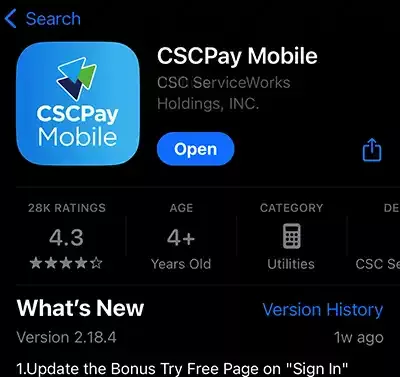
- To submit a service request, go to the iOS App/Play Store and search “CSC Pay Mobile.”
- Download the “CSCPay Mobile” App.
- In the CSCPay app at the bottom of the screen, tap “More.”
- Tap “Request Service.”
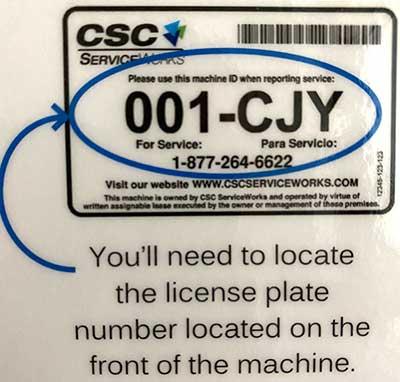
- Locate the plate number and bar code on the front of the machine and scan the bar code with your phone or type to enter the 6-digit machine ID.
- Tap “Submit.”
For more information, visit CSC Serviceworks Campus Laundry.*

Reach out to staff committed to helping you navigate challenges, discover opportunities, and achieve your fullest potential.